Brightlight Health SMS consent process
This page documents the live opt-in flow for Brightlight Health's transactional SMS program. Consent is collected inside the authenticated patient portal. This page is published so patients, carriers, and compliance reviewers can read the exact disclosure and review the consent experience without holding a patient account.
Where consent is collected
Consent is collected at patient.brightlight.ai under Security and Preferences, after the patient signs in. Brightlight does not collect SMS consent on this public page, on any third-party site, or from any purchased, rented, or shared list.
- The patient provides a mobile phone number when creating their account, or confirms it in the portal under Profile, in the Contact section.
- The patient signs in to the Brightlight patient portal.
- The patient opens Security and Preferences.
- The patient reads the SMS disclosure reproduced in full below.
- The patient actively turns on the separate Text messages control. It is off by default for every new patient and is never pre-selected.
SMS consent is optional and separate from the Terms of Service and Privacy Policy. It is not required to create an account, book an appointment, purchase services, or receive care.
Patient portal, Security and Preferences
The consent control and its disclosure
Below is a screenshot of the live control as it appears to a signed-in patient under Security and Preferences, in its default off state, followed by the same disclosure as selectable text.
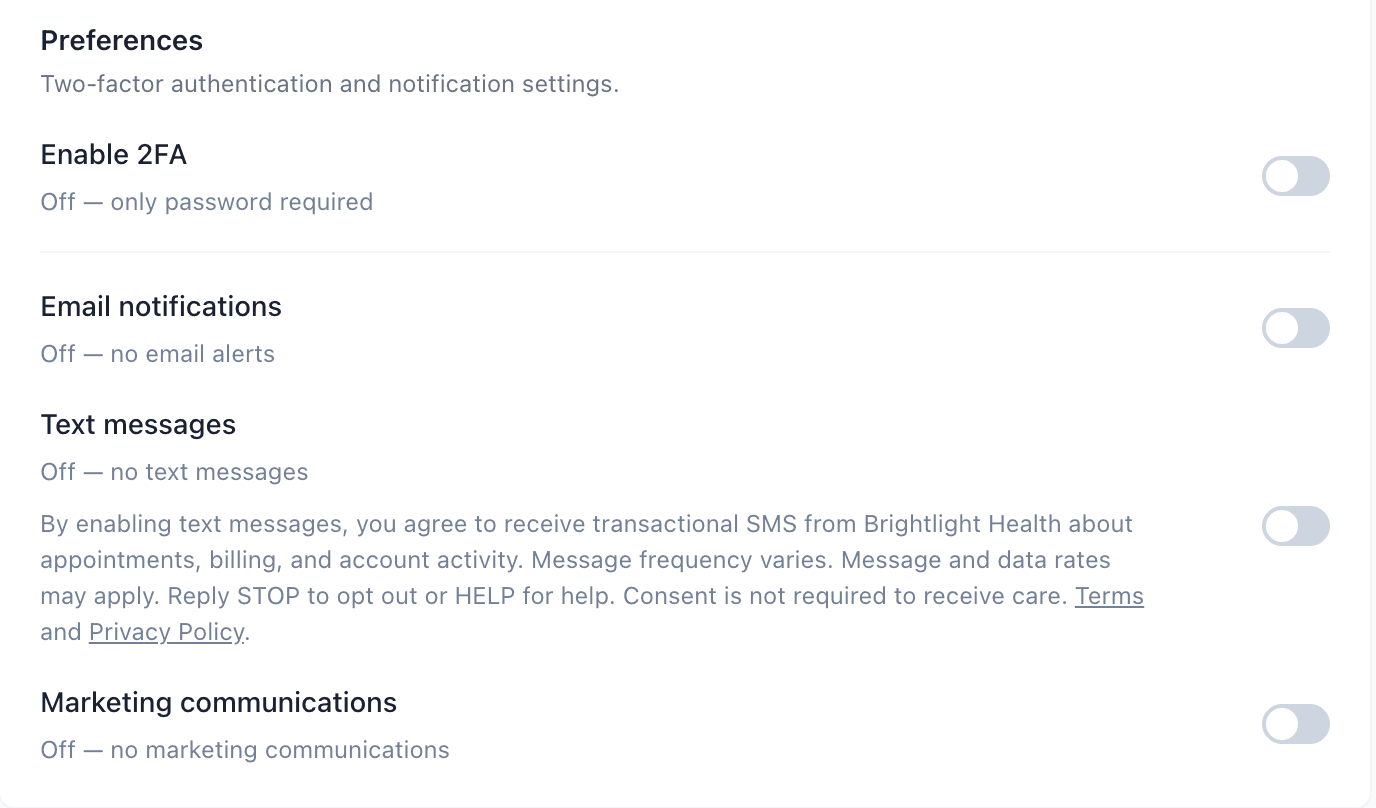
Text messages
Off — no text messages
By enabling text messages, you agree to receive transactional SMS from Brightlight Health about appointments, billing, and account activity. Message frequency varies. Message and data rates may apply. Reply STOP to opt out or HELP for help. Consent is not required to receive care. Terms and Privacy Policy.
What we send, and what we record
- Messages are transactional only, covering appointments, billing, and account activity. Brightlight does not use this consent to send marketing or promotional messages.
- Message frequency varies. Message and data rates may apply.
- We do not sell SMS consent or phone-number information, and we do not share it with third parties or lead generators for their own marketing or promotional purposes. See our Privacy Policy.
- Consent applies only to Brightlight Health messaging. It is never transferred, assigned, or reused for another sender or program.
- When a patient opts in we record the consent source, the disclosure version they were shown, the phone number, and the date and time.
How patients opt out or get help
Patients can reply STOP to any message to opt out, or turn off Text messages in the patient portal at any time. Reply HELP for help, or contact info@brightlight.ai.